
Category: New/Upcoming Releases
Posts talking about newly released or upcoming LearnKey courses.
New Course Release: Project 2013
LearnKey’s Project 2013 course will introduce learners to the new features of Project 2013. Join LearnKey expert Michael Solomon as you learn how to start a project, create a schedule, manage resources, and more. This course is perfect for beginners and experts alike.
Our hope is that through our courseware we may provide learners with the guidance, preparation, and skills they need to succeed. For more information and to learn about additional LearnKey products visit our website.
New Course Release: Windows 8.1 Configuration
In LearnKey’s Windows 8.1 Configuration course students will learn what’s new in the latest Microsoft operating system: Windows 8.1. Join LearnKey expert Tom Carpenter as he covers topics such as upgrading to Windows 8.1, remote access, mobility, and more! Once you understand the new features and changes in this OS, you will see that it is a pleasure to work with.
Our hope is that through our courseware we may continually provide learners with the guidance, preparations, and skills they need to succeed. For more information and additional to learn about additional LearnKey products visit our website.
Spanish IC3 and Me
Not long ago, LearnKey released a course on IC3 GS4 with Spanish audio and English text. The course was designed to allow Spanish speaking students to learn computing skills by hearing their native language while seeing the computer terms in English.
A couple of months ago, the decision was made to revamp this course by converting all of the graphics into Spanish. This new course is designed to allow Spanish speaking students to learn computing skills by hearing and seeing computer terms and practices in full Spanish. As a result of this decision, I spent most of the last two weeks reviewing the English version of IC3 and recapturing all of the screen captures using Spanish versions of Microsoft Office and the Adobe Creative Suite.
I have captured several courses over the years, including both the full screen and widescreen versions of English IC3 GS4, but this experience was a little different and more complicated than what I had gone through in the past.
To begin with, I don’t speak Spanish. When I was in high school and had to choose a foreign language class, I chose to take French. I was heavily involved in theater and thought French would serve me better in the performing arts than Spanish. About the only Spanish I know is the little bits and pieces I picked up watching “Dora the Explorer” with my daughter nearly a decade ago.
After getting the Spanish versions of Windows and all the software I needed installed, it took me a little while to get into the rhythm of things. Whenever I clicked on the wrong items, I couldn’t read the screen to tell where I was and how to get back to where I wanted to be. Luckily I was able to use the English course as a reference, and I eventually learned that if I worked really hard ahead of time to memorize the look of the icons I needed it was easier not to get lost. I also found that using an online translator was invaluable. The translations probably weren’t perfect, but they were close enough to help me understand what the buttons and error messages said whenever I found myself off course.
Now before anyone out there gets the wrong idea about this course, I’m just a minor cog in the great machine which is working on this course. After I finished the screen captures, I sent them on to the design team, several members of which are fluent in Spanish. My screen captures will be thoroughly reviewed and any mistakes I may have made will be sent back for me to recapture. After the design team finishes reviewing my files and translating the rest of the course graphics into Spanish, the course will be put through a rigorous quality control process to catch any leftover mistakes.
Stay tuned for the release of IC3 Global Standard 4 – Full Spanish in the next couple of months.
New Course Release – Security+ (SY0-401)
We are excited to be releasing our new Security+ course. This course is perfect for those who are working to move forward in their IT career or keeping their skills and knowledge up-to-date.
In LearnKey’s Security+ course students will develop their understanding of network administration by gaining this CompTIA certification. Students will develop an understanding of network administration and will learn how to secure and manage all facets of a network from CPU cycles to software used by individuals or across a network. Security+ is the next level to attain certification for every IT network administrator.
Our hope is that through our courseware we may continually provide learners with the guidance, preparation, and skills they need to succeed. For more information and additional LearnKey products visit our website.
New Course Release – Computer Foundations 2014
What’s my favorite part about our Computer Foundations 2014 course? It’s stunning. I have to give credit, applause, high-five, two thumbs up to our design team. I know that I speak for everyone in the company when I say that this course looks fantastic. This course has more than its looks going for it. This course is perfect for anyone who is wanting to learn the basics and is full of helpful facts and tips about computing.
This course covers the basic foundations of using a computer, while ensuring that the content is easy to understand and follow. Students will learn how to choose the appropriate programs to complete important and useful tasks. By the end of this course students will feel comfortable using the technology presented and be confident in their skills and knowledge.
Our hope is that through our courseware we may continually provide learners with the guidance, preparation, and skills they need to succeed. For more information and additional LearnKey products visit our website.
New Course Release – InDesign CC
Another great course released. All summer we have been releasing our new Adobe CC courses. I am excited to add InDesign CC to our list of Adobe CC courses: Illustrator CC, Dreamweaver CC, Photoshop CC, and Premiere Pro CC.
If you want to become a publishing professional in today’s workforce, it is important to have a working knowledge of Adobe InDesign. Our new InDesign CC course is taught by LearnKey expert Linda Dickeson, and will provide you with the skills you need to create layouts for both screen and print. This new course will teach you how to use some of the newest features of InDesign CC such as: Simplified Hyperlinks, Sync Settings, EPUB enhancements, and so much more!
Our hope is that through our courseware we may continually provide learners with the guidance, preparation, and skills they need to succeed. For more information and additional LearnKey products visit our website.
New Course Release – Illustrator CC
I am excited to announce the release of LearnKey’s news Adobe CC course. Illustrator CC joins Dreamweaver CC, Photoshop CC, and Premiere Pro CC as our newest course. This course is perfect for students who are interested in a career as a web or graphic design professional.
LearnKey’s new Illustrator CC course provides a visual and intuitive interface for users to learn about the graphic editing capabilities of Illustrator CC. Join LearnKey expert Lee Wiley as he teaches you to effectively use the new Illustrator CC software. Learn about the new features in Illustrator CC such as: Live Shapes, Windows GPU acceleration, Typekit missing fonts workflow, and much more!
Our hope is that through our courseware we may continually provide learners with the guidance, preparation, and skills they need to succeed.
New Course Release – Dreamweaver CC
It’s been a busy summer at LearnKey. We are excited to announce that we have released another Adobe CC course. Joining our Photoshop CC and Premiere Pro CC courses is Dreamweaver CC. This course will prepare students for the Dreamweaver ACA exam with online video courseware, hundreds of practice test questions with our pre/post tests, and labs and demos that will help students practice and learn the skills presented during the video training.
Our new Dreamweaver CC course provides an intuitive and visual interface for users to learn about the website creating and editing capabilities of Dreamweaver CC. Join LearnKey expert Chad Chelius as he teaches you how to effectively use the new Dreamweaver software. He will also teach you the new tools and features found in Dreamweaver CC such as: enhanced fluid grid layout, CSS designer panel, and more!
Our hope is that through our courseware we may continually provide learners with the guidance, preparation, and skills they need to succeed.
Exam Prep with Tom Carpenter
Exams can be a stressful experience, but that doesn’t mean you have to go in unprepared. LearnKey and Tom Carpenter, president of SysEdCo and frequent LearnKey author, have teamed up to create a short course to help test takers understand two things:
- How to pick the most important parts of an exam, and
- How to learn the material and retain information.
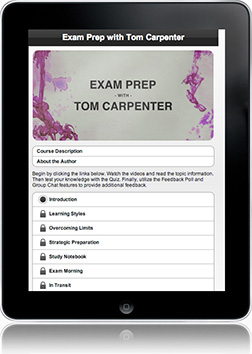
Exam Prep with Tom Carpenter, created on the LearnCast platform, is broken into eight sections covering three main topics: preparation techniques, tips for retaining information, and best practices for taking exams. In this course, you will learn how to best prepare and take a technical exam leading to success.
Whether you are taking an exam for a class or preparing for industry certification, this course can provide you with tricks for retaining important information and give you valuable insights into the different ways people learn. Topics include Overcoming Limits, Strategic Preparation, and Dealing with Stress.
Exam Prep with Tom Carpenter can be purchased through the new LearnKey app, now available in the iTunes app store.
New Course Release – Premiere Pro CC
Joining Photoshop CC our newest course Premiere CC was released last week. Those who take our Premiere Pro CC course will feel prepared to take the Premiere Pro ACA exam and have access to hundreds of pre/post questions long with relevant labs and demos that will help students practice what they are learning and become familiar with the newest features of Premiere Pro CC.
Those who are interested in a career in video and audio production need to have a working knowledge and practical experience in Adobe’s Premiere Pro CC software. This course will teach you how to effectively use the new Premiere Pro CC software, allowing you to edit video and audio more effectively and efficiently. LearnKey expert Ryan James will teach you how to customize the program, helping your workflow fly. He will also teach you how to use the new features found in Premiere Pro CC. Among these new features are: New Master Clip Effects, Live Text templates, and new masking and tracking capabilities.
Our hope is that through our courseware we may continually provide learners with the guidance, preparation, and skills they need to succeed.