
Tag: Certification
A+ 2012 Filming

Recently I had the opportunity to travel to the Salt Lake City office to see some of the filming of our newest CompTIA A+ Certification courseware – presented by Tom Carpenter. Tom has presented quite a few of our IT courses, and if you’ve ever taken one of them before, you know that he’s a great choice to take the lead on the next version of LearnKey’s most popular courseware series. If you haven’t seem Tom in action, watch this video in which he discusses our Voice over IP Fundamentals course:
From what I’ve seen, this course is going to be one of the best, most engaging courses LearnKey has ever produced. Our production teams are going all out to make it entertaining as well as educational, so if you’ve been wanting to get your A+ certification, you’ll definitely want to stick around for this release.
For more video clips, check out our YouTube Channel. Tom has presented many LearnKey courses, so there are plenty of videos to choose from if you would like to dive in.
…and of course, there is always the infamous Blooper Reel!
LearnKey First Quarter rollout of enhanced courses and products for 2012!
It is starting to be really busy with our LearnKey 2012 production shoot schedule, and I’m very excited with some of our new courses and exams recently released the past three weeks. It started with our February 2012 release of our Advanced Security Practitioner Certification (CASP) course designed to provide students with an explanation and understanding of conceptualization of security topics, as well as theoretical instruction/demonstrations in designing and engineering security solutions. This training course prepares students for the CompTIA exam CAS-001. LearnKey Expert course instructor Tom Carpenter does a very thorough and solid job covering the key objectives.
Earlier this week we successfully released our Flash CS5 MasterExam™ that helps IT certification candidates put the finishing touches on their comprehension and confidence as a final step before sitting for the exam. With over 200 questions, this supplements the training and hands-on experience needed to pass the Adobe® Certified Associate (ACA) Rich Media Communication with Adobe® Flash® certification exam.
Another release this week is our PowerPoint 2010 MasterExam 77-883 which is a great way to assess the skills of your staff with the individual components of PowerPoint 2010. Increase productivity by discovering and correcting skill deficiencies, or to find out how proficient prospective employees are before you hire them.
We ended the week releasing our Dreamweaver CS5 MasterExam™ with over 200 questions that supplements the training and hands-on experience needed to pass the Adobe® Certified Associate (ACA) Web Communication with Adobe® Dreamweaver® certification exam.
Over the next couple of weeks I will share with you our 2012 Production release schedule for the remainder of the year. One teaser I can share with you is a very exciting course we plan to release about leveraging behavior – a perfect life skills and career readiness topic.
We are off to a great start, and I promise to keep you posted on our most recent product releases!
Veteran benefits provide certifications and new job skills through LearnKey courseware
I just want to write a few words about a friend of mine that I met through our VA vocational rehabilitation program. Chris and I were introduced over this last summer when he began using the LearnKey program to advance his IT career. At the time, he was working in an IT role, but in a limited, part time position. Over several months of interaction, I have come to think of Chris as a friend as our whole group has been following his progress and cheering his success. In January, I was able to meet Chris face to face as he came into our recording studio to shoot a testimonial video. It was a great experience to get better acquainted and to learn that Chris served as a combat engineer in Baghdad, the same role in which my father served during WW2.
What’s Your New Year’s Resolution?
At the beginning of every year, people from all over the world make a vow to improve their lives. Sure, you can say things like “I’m losing weight!” or “I’m going to exercise more!” like millions of others, but unfortunately most people don’t stick with it. So, with typical New Year’s Resolution failure rates extremely high, why not try something new this year – get a certification or gain a new job skill.
As several studies in the past few years have concluded, employers claim they can’t find enough qualified people to fill the available jobs. If there is a lack of qualified job candidates, that means the qualified ones will stand out even more than before. That means that if you’re qualified, your chance at landing the job you’re after just skyrocketed.
See for yourself – take a look at the job results when you search for “A+ Certification”.
Want to learn Adobe Photoshop? Here are some jobs requiring Photoshop skills.
Mobile apps are huge right now – and they all need skilled developers to create them. Here are some Mobile App Developer jobs.
I’m not going to lie, mastering a new skill and gaining a certification takes dedication and focus. It’s not something you can set aside an hour every few weeks to work on, you really have to work at it. The same rule applies to pretty much anything that will improve your life, though. Want to lose weight? You’re going to have to put some serious time in at the gym and watch what you eat. Working out for a few minutes once every two months won’t cut it.
So if you really want to work on adding new skills to your résumé, why not get started now? Who knows, maybe once you land that new job, you’ll get more free time to focus on some of your previous resolutions!
Veteran Certification on Veterans Day
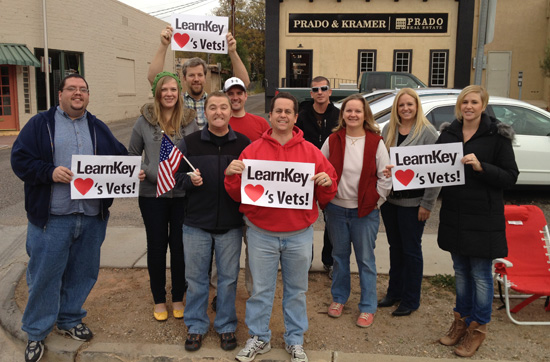
Showing support at the 2011 St. George Veteran’s Day Parade
LearnKey has been working with the VA VR&E (Vocational Rehab and Employment) program for the last year. The VR&E program is specifically for those veterans who have partial service related disability and the goal is to help the veteran find suitable employment and careers. We offer a number of courses and bundled program packages for the veterans which range from Web design, Graphic design, Cisco Pro, Video production, SharePoint, Office 2010, QuickBooks, CompTIA, Project Management, Database design, Windows Server, etc. We even help the veterans to find jobs with employers where they will truly fit in with the company culture.
I wanted you to know that just yesterday, we had one of the veterans we work with certify in CPEH (Certified Professional Ethical Hacker)! Chris L. has been studying using his LearnKey program that was provided by the VR&E program at the VA. He has been working hard and that work is certainly paying off. He is the first veteran in our program to attempt the CPEH and he will soon take the CPTE (Certified Pen. Testing Engineer) exam. Great job and good timing Chris, you managed to get that certification just in time for Veterans Day!
Word 2010 Certification Journey Continues
So I am still working toward my certification and have found time to finish up with session 1 of our Word 2010 training. I took the post test for session 1, and apparently I need a review. I didn’t do so well on it, but the great thing is that you get to print out a study guide that shows you the questions that you missed, and you can see what sections the questions are in so that you can go back to those spots and review the material.
After I picked my ego up off the floor, I started watching the training for session 2. The topics covered in this session are: Working with Templates, Formatting Text, Formatting Paragraphs, Organizing Data, Bulleted and Numbered Lists, Manipulating Page Layout, Manipulating Page Backgrounds, and Headers and Footers. I found a lot of information in this session very helpful, but one feature stuck out to me and alone is worth upgrading to Office 2010; it is called Autotext and it lets you save text you use regularly under the Quickparts section, then when you need it you can just insert it into any Word document. This is a great time saver, and when I am writing press releases this would be so nice to have for the About Us section.
Again, this session provides you with material that will be on the certification exam, but also gives you some great shortcuts that you can start using right away.
My Certification Journey

Yeah! I finally dove into my Word 2010 training and I am so excited because I have already learned so many great new tricks in just the first session. If you are like me sure you can function in Word, but you are not necessarily the most efficient in the program, well that is the great thing about our training because not only is it preparing you for a certification exam you also learn shortcuts and new tricks that will help you be more efficient. There is a new File tab in this version that replaces the Office Button, which is probably the biggest layout change.
I have some tricks to share with you for Word 2010:
Continue reading “My Certification Journey”
Certification Journey: Moving along slowly
I saw that our Word 2010 course was only three sessions long, and I thought to myself, “This is going to be easy, and I will be ready to take my certification test in no time!” Well, procrastination is one thing I am very good at, so it has taken me longer to get started than I thought it would.
Finally last night after a long day at work, I made myself open up the training and get started (this was due in large part to the fact that there was nothing decent on TV).
In our training, we have this great feature: the Pretest. This kind of acts like a gauge to let you know how much knowledge you already have about the information in the course, and what areas you will need to focus on. I looked at the pretest and thought to myself, “Not a problem. I am going to ace this test in about 10 minutes and then I can back to reading my book.” My reasoning behind this thought was that I have been using Word since my high school days, and now I use Word pretty much every single day at work. Well, I had another thing coming to me. I went through the test in about 15 minutes, but as I did, the realization slowly crept in on me that I had no clue. There were a lot of terms I did not know and a lot of features I was clueless about. At the end of the pretest, when the results said I failed, I was pretty disappointed in myself and a little nervous about the challenge I was taking on.
The good thing is, I realized I have a long way to go to learn everything there is to know about Word, which worked as a motivator. So with this in mind, I started looking through the resources section of our training and looked at the glossary to find the definitions of many of the terms I had missed on the pretest. My lack of knowledge also made me think that this is something I really need to do so that I can function more efficiently in Word at work. So I am making the commitment to continue to make progress on this journey every week. I’ll keep you posted on my progress! If you are currently on your own certification journey, let us know how it is going for you, and any achievements or set backs you have faced trying to get certified.
CTP+ Replaces Convergence+
CompTIA has replaced Convergence+ with CTP+ as its convergent technologies exam. This exam focuses on knowledge and skills needed to sell and service convergent technologies some of the concepts covered are requirements analysis, voice and multimedia applications. It is recommended that candidates have attained Network+ certification and have work experience in data networking and/or telephony fields. (View more information about CTP+)
At this time we are not offering this course, but I would like to find out if people are interested in this certification. Is this the certification you have been waiting for? Do you have previous certifications and are looking to add to your resume with this certification? If you are interested would you be getting it for you current position and if so what are some of your job roles?
JavaScript Fundamentals Course Available!

If you read the recent post about Dice.com’s jump in ITIL requests, you should definitely finish reading this. JavaScript skills requests jumped by 98% to nearly 7,919 postings. In a recent article on Dice they talked about how there were 1,100 positions availble for people with JavaScript experience in the Silicon Valley alone.
If you are looking for a new career path to follow, with so many positions available, this may be the one! LearnKey has just released our newest JavaScript Fundamentals Course – for more information visit the product page at www.learnkey.com/js_fundamentals.